 PA Trace for live sound
How to check loudspeaker polarity
A loudspeaker wired in reverse polarity pushes where the others pull. On its own it sounds almost normal; next to a correctly wired box it cancels exactly where the two overlap. A measurement finds it in seconds, as long as you know which view to trust for which kind of source.
Updated 17 November 2026
Why it matters
Polarity is the sign of the signal. A swapped pair of wires in a speaker cable, a miswired connector or a polarity switch left on in the processor flips it. Where a reversed source overlaps with a correct one, the two subtract: two boxes in a column lose their low end, a sub and a top cancel at the crossover, a front fill thins out the front rows. That is why checking every box is the first step of a tuning, before any EQ.
Check 1: the impulse response
For a full-range box, the quickest check is the impulse response on a linear scale. The main spike of a box in correct polarity points up. A reversed box points down.
- Mute everything except the box you check.
- Play pink noise and start the transfer function.
- Find the delay so the spike sits at the inserted delay.
- Look at the live impulse response in Lin (linear) view: up or down.
Repeat for every box. It takes a few seconds per box and catches swapped cables before they cost you an hour.
Check 2: the phase
With the delay set, a reversed source sits 180° away from where it should be across its whole band. Capture a box you know is correct, then compare the others against it: a trace that runs parallel to the reference but 180° off is reversed. Many analyzers let you flip the polarity of a stored trace to confirm it, without touching a cable.
When the quick check lies
- Subwoofers and band-limited ways. A sub, or the high section of a two-way box, is filtered. Its own filters turn the phase, so its impulse response can look inverted when it is not. Do not judge a sub by the spike.
- Loudspeakers whose phase turns through 180° in the band. On many boxes the phase rotates that far through the crossover, so a single automatic delay find cannot decide the polarity. Judge it on the phase trace instead.
- A strong reflection can be louder than the direct sound and point either way. Move the microphone away from surfaces or look at the first arrival.
Polarity at a crossover
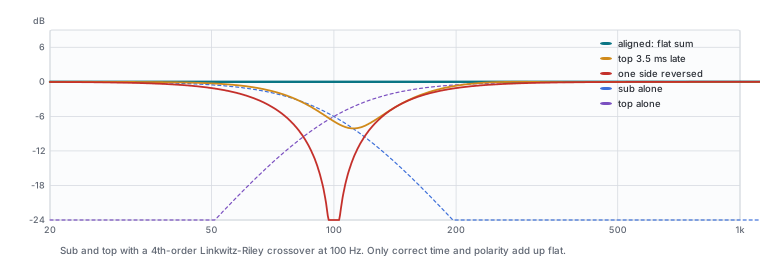
For two sources that overlap, such as a sub and a top, polarity and delay are one question: which combination makes them add up at the crossover? Measure each alone from the same position with the same inserted delay and compare their phase through the overlap. If they are about 180° apart over the whole overlap, flip one. If they are parallel but shifted, it is a time difference, not a polarity problem. The full method is in how to align subs and tops.
Polarity is not phase
People often say "phase" when they mean polarity. Polarity is a flip of the whole signal, the same at every frequency. Phase is a time shift that differs with frequency: a delay, a filter, a crossover. A polarity switch cannot fix a time difference, and a delay cannot fix a reversed cable. At one frequency the two can look alike, which is why you check the whole overlap and not a single point.
In PA Trace: the Live IR pane above the phase shows the spike of the selected engine; set its scale to Lin. The Delay Finder shows INV suggested only when the loudest arrival is clearly reversed. To try a polarity flip on a stored trace, select it and tick Invert Polarity under the trace list. Auto Phase works out the polarity and delay for two or three overlapping sources and gives a confidence.
Related guides
- How to align subs and tops Delay and polarity at the crossover, measured and checked across the audience.
- Delay speakers and fills Measure the arrival of each source where they overlap, delay the earlier one, and check the comb filter is gone.
- How to tune a PA system, step by step The order of work, from verifying the system to EQ and documentation.
- Transfer function measurement, explained Magnitude, phase, coherence and the impulse response: what they are and how to read them.