 PA Trace for live sound
How to time delay speakers, fills and delay towers
A front fill, an out fill or a delay tower covers listeners the main system also reaches. Where both are heard, they must arrive together, or the overlap turns into a comb filter that sounds hollow and phasey. The method is the same for all of them: measure each arrival in the overlap, delay the earlier one, and measure the result.
Updated 17 November 2026
Why: the comb filter
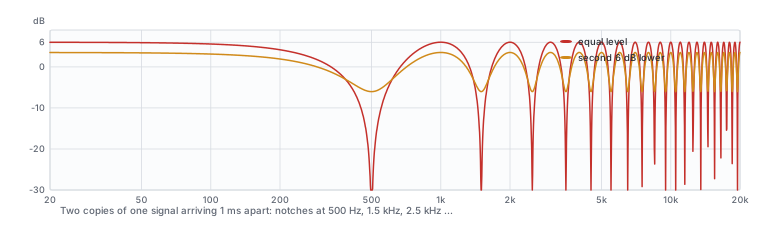
When the same sound arrives twice, the two copies cancel wherever they are half a cycle apart. Two arrivals 1 ms apart cancel at 500 Hz, 1.5 kHz, 2.5 kHz and so on, a row of notches like the teeth of a comb. The closer the two are in level, the deeper the notches. EQ cannot fill them; timing can remove them.
What you need
- A dual-channel analyzer with the reference taken from the console output that feeds both systems.
- Access to the processor outputs of the main system and of the fill or delay.
- A way to mute each source on its own.
- The air temperature, for converting time to distance.
Step 1: put the microphone in the overlap
Place it where the two sources are about equally loud: the transition between their coverage. For a delay tower, that is usually a little in front of the tower, where the main system has fallen to the tower's level. For a front fill, it is the second or third row, where the fill hands over to the mains. A position deep in either source's coverage gives an alignment that only matters where the other source is not heard anyway.
Step 2: measure each arrival
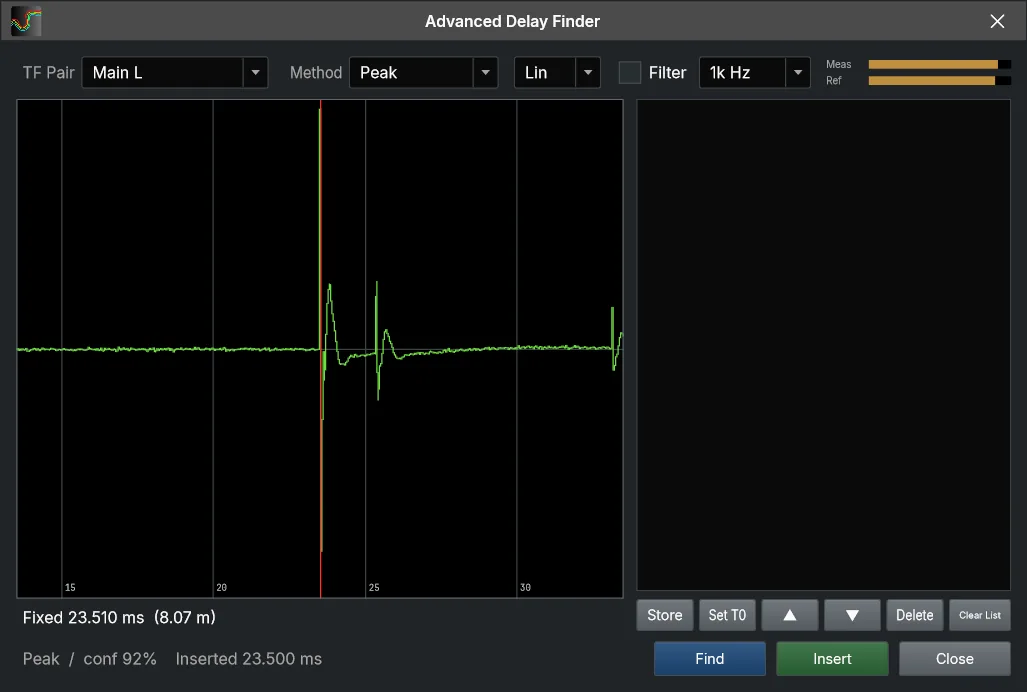
- Main system alone: find the delay. That is its arrival time at this position.
- Fill or tower alone, same microphone, same position: find its arrival time.
- The difference is the delay to set on the earlier source.
The earlier source is almost always the closer, secondary one. It waits for the main system, because the audience should localize the sound to the stage: if the fill arrives first, it pulls the image toward itself. Many engineers add a few milliseconds beyond the exact match for the same reason; whether you do depends on how much the two overlap and how loud the fill is.
Step 3: set it and listen to the overlap
Enter the delay on the processor output of the earlier source. Then play both together and measure again at the same position. The comb filtering in the overlap should be gone, and the sum should be smoother and louder than either source alone. If a ripple remains, fine-tune the delay in small steps while you watch the magnitude, or compare the phase of the two sources through the band where they are within about 10 dB of each other.
Temperature changes the distance
Sound travels about 343 m/s at 20 °C and about 352 m/s at 35 °C. The delay in milliseconds that you measure is what counts, but if you plan a delay from distances, or convert a measured time into meters to check it, use the air temperature of the day. On a hot outdoor show, a 15 m delay tower is 25 to 40 cm off against the 343 m/s figure. Over an evening the air cools, every arrival moves with it, and a long delay line shifts more than a short one.
Finding the arrival when it is not obvious
- A reflection louder than the direct sound makes a peak-based finder pick the reflection. Use the first strong arrival instead.
- A band-limited source such as a sub has a broad, rounded impulse response. Find its delay within its own octave band (for a sub, around 63 Hz) or with the energy-time curve.
- Wind moves the arrival from second to second. Average deeper and repeat the measurement; take the value that repeats.
Several sources, one reference
On a large system you may time a main left and right, a center cluster, front fills, out fills and two rings of delays. Keep one time reference, normally the main system at a main position, and time everything to it at its own overlap. Write each delay and position down: the next time you are in the venue, you start from those numbers.
In PA Trace: Find on the engine card shows the delay it found before inserting it, with Peak, ETC or First arrival methods and the distance at the air temperature set in Config > Air Temperature. The Advanced Delay Finder adds an octave-band filter, Store and Set T0. For a fill that overlaps the mains over a wide band, Auto Phase can fine-tune the delay from captures of each source.
Related guides
- How to align subs and tops Delay and polarity at the crossover, measured and checked across the audience.
- Polarity check Read polarity in the impulse response and the phase, and why subs and crossovers fool the quick check.
- How to tune a PA system, step by step The order of work, from verifying the system to EQ and documentation.
- Coherence explained What the coherence trace means, what each pattern of low coherence points to, and how to raise it.